
Create Your First Service
A service is what customers book in TailDesk. Before you add a booking form or availability calendar to your website, create at least one service and configure its basic booking settings.
Create a new service
- Log in to your WordPress dashboard.
- Click Taildesk in the left sidebar
- Click the button “Add New” on top of the page
- Enter a clear service name that customers will recognize, for example In-Home Cat Sitting, Dog Boarding, Holiday Rental or Equipment Hire.
- Set the basic booking values, including the daily price and capacity.
- Make sure the service is active if you want it to be available for bookings.
- Save the service.
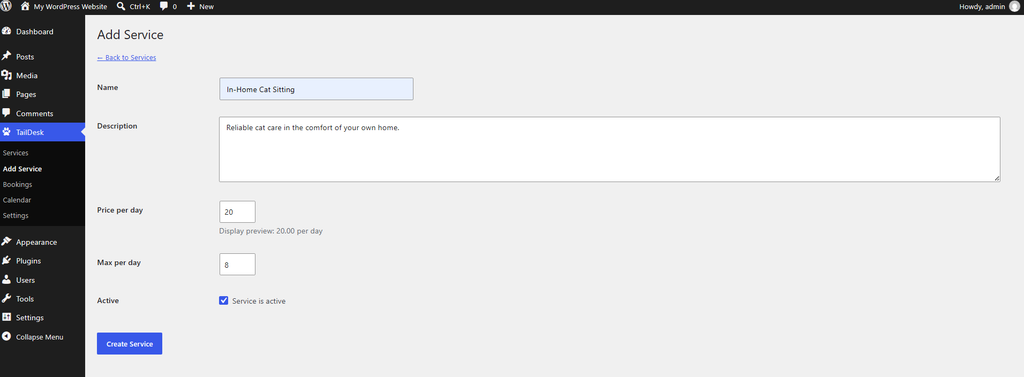
Basic settings meaning
Service name is the name shown to customers when they select what they want to book.
Description is an internal description to identify the service.
Daily price is the base amount TailDesk uses when calculating the price for a booking. More advanced pricing options can be configured separately.
Capacity determines how many bookings or units can be available for the same date. TailDesk uses this value when calculating availability.
Check your service
After saving, return to the services overview and confirm that your new service is listed and active. You can edit it later to add custom booking fields, minimum booking durations, pricing rules and other options.