
Configure Extra Options, Surcharges and Pricing Rules
TailDesk Pro lets you extend a service price with optional extras and date-based pricing rules. You can charge once per booking, per day, per selected unit or per unit per day, and you can add surcharges or discounts for specific dates and repeating periods.
Add service extras
- Go to TailDesk > Services.
- Edit the service you want to configure.
- Open the Service extras tab.
- Click Add extra.
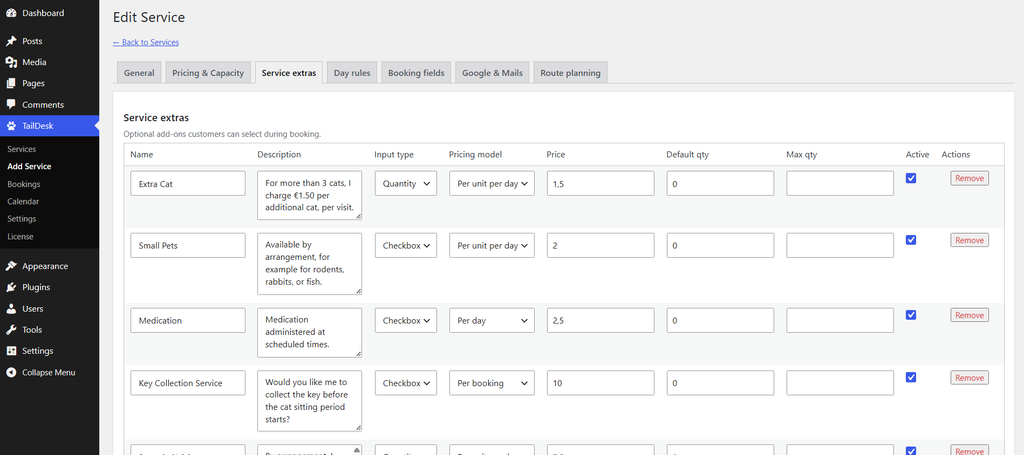
Each extra can contain:
| Field | Purpose |
|---|---|
| Name | The customer-facing name of the extra. |
| Description | Optional explanation shown with the extra. |
| Input type | Checkbox or Quantity. |
| Pricing model | Determines how the extra amount is calculated. |
| Price | The unit price used by the selected pricing model. |
| Default qty | The initial quantity for Quantity extras. |
| Max qty | Optional maximum quantity. |
| Active | Controls whether the extra is available to customers. |
Choose Checkbox or Quantity
Checkbox extras are either selected or not selected. When selected, TailDesk treats the quantity as 1.
Quantity extras let the customer choose an amount. If you configure Max qty, TailDesk caps the calculated quantity at that maximum.
Understand the four pricing models
Let P be the configured extra price, Q the selected quantity and D the number of billable days.
| Pricing model | Formula | Example |
|---|---|---|
| Per booking | P | €10 extra = €10 once |
| Per day | P × D | €5 × 3 days = €15 |
| Per unit | P × Q | €4 × 3 units = €12 |
| Per unit per day | P × Q × D | €2 × 3 units × 4 days = €24 |
Important: Per booking and Per day do not multiply by quantity, even when the extra uses a Quantity input. If quantity should affect the price, use Per unit or Per unit per day.
Inactive extras are ignored by the pricing engine.
Add surcharges or discounts with Day Rules
- Edit the service.
- Open the Day rules tab.
- Click Add day rule.
- Choose a Start date and End date.
- Configure the repeat and price adjustment settings.

Price adjustment types
A matching Day Rule can use one of these price adjustments:
- None – do not change the price.
- Percentage base price – apply a percentage of the service base price for each matching billable day.
- Percentage total price – apply a percentage using a per-day basis derived from the base price plus selected extras.
- Fixed amount – add or subtract a fixed amount for each matching billable day.
Positive values create a surcharge. Negative values create a discount.
Percentage base price
For each matching day, TailDesk calculates:
Base price per day × adjustment percentage
For example, a 20% surcharge on a €50 daily service adds €10 for each matching billable day.
Percentage total price
TailDesk first derives a per-day basis from the base booking price plus selected extras, then applies the percentage for each matching day.
This is useful when the adjustment should also reflect selected extras rather than only the service’s base daily rate.
Fixed amount
A fixed adjustment is applied for every matching billable day.
For example, a fixed surcharge of €7.50 on two matching days adds €15.00 to the booking.
Use the Reason field
The optional Reason field describes why the adjustment exists. TailDesk can use this description in the detailed price breakdown, making surcharges and discounts easier to understand later.
Repeat pricing rules
Day Rules can repeat:
- Only once
- Weekly
- Monthly
- Yearly
The Start and End dates define the width of the matching window. For repeating rules, the End date is not a final recurrence date; the same window repeats according to the selected interval.
Monthly and yearly recurrence adjusts impossible dates to the final valid day of the shorter month where necessary.
Rule order matters
If multiple Day Rules match the same date, TailDesk uses the first matching rule for the standard rule result. Matching Day Rules are not automatically stacked together.
For predictable pricing, avoid overlapping rules unless you intentionally understand which rule has priority.
Excluded days are not charged
If TailDesk Pro excludes an individual date from an existing booking, that date no longer counts as a billable day and does not receive Day Rule price adjustments.
How the final price is built
A Pro booking can combine the service base price, selected extras and matching Day Rule adjustments. Administrators can also add manual adjustments later from Booking Details.
Conceptually:
Total = Base + Extras + Day adjustments + Manual adjustments
Show customers a detailed price
TailDesk Pro can show Total Price or Detailed Price in the public Booking Form. Detailed Price is especially useful when extras or Day Rule adjustments are enabled because customers can see how the total is built.
These pricing tools let you keep one service while still handling optional add-ons, weekend surcharges, seasonal discounts and other real-world pricing differences without creating duplicate services for every variation.