
Configure Company, Tax and Invoice Details
TailDesk uses the Invoice settings to control which company details appear on invoices, how tax is calculated and how invoice numbers are assigned. Configure these settings before generating invoices so each new invoice uses the correct business and tax information.
Open the Invoice settings
- Go to TailDesk > Settings.
- Open the Invoices tab.
- Enter your company, tax and numbering details.
- Click Save invoice settings.
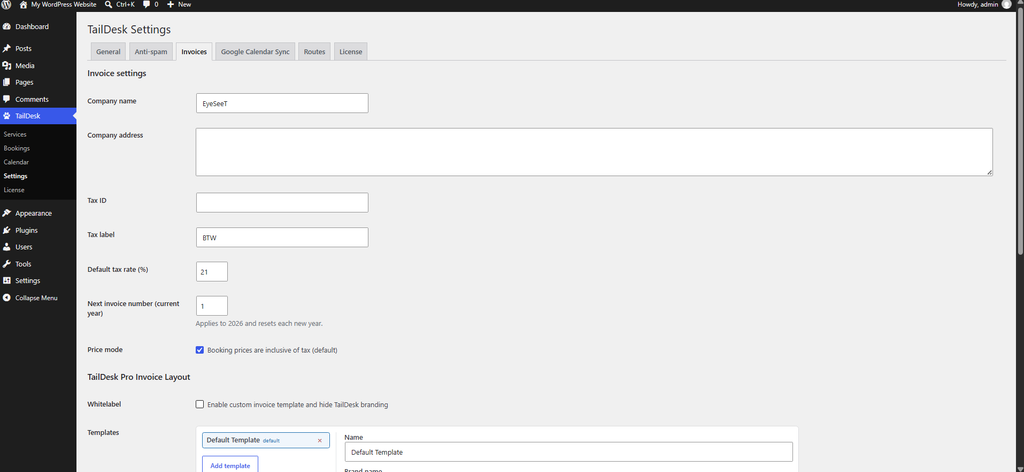
Company details
| Field | What it controls |
|---|---|
| Company name | The issuer name shown on the invoice. |
| Company address | The issuer address shown on the invoice. |
| Tax ID | Your VAT, tax or company tax identifier. |
| Tax label | The text used for tax on the invoice. The default is Tax. |
These values are copied into the invoice snapshot when an invoice is generated. Changing them later does not silently update invoices that already exist.
Set the default tax rate
Use Default tax rate (%) to set the percentage TailDesk should use when calculating tax. The value must be zero or higher.
The tax calculation also depends on whether your booking prices are configured as tax inclusive or tax exclusive.
Inclusive tax mode
Enable Booking prices are inclusive of tax when the booking total already contains tax.
In inclusive mode, TailDesk derives the subtotal excluding tax from the stored booking total.
Conceptually:
Subtotal excluding tax = Total including tax / (1 + tax rate)
Tax = Total including tax - Subtotal excluding tax
For example, if a total of €121.00 includes 21% tax, the subtotal excluding tax is €100.00 and the tax amount is €21.00.
Exclusive tax mode
Disable the inclusive-tax option when the stored booking price should be treated as the subtotal before tax.
Conceptually:
Tax = Subtotal × tax rate
Total including tax = Subtotal + Tax
For example, with a subtotal of €100.00 and a 21% tax rate, TailDesk calculates €21.00 tax and a €121.00 total including tax.
Configure the next invoice number
The Next invoice number (current year) field controls the next sequence number TailDesk will use for the current year.
Invoice numbers use a yearly sequence in a format such as:
2026-0001The sequence is separate from the booking ID and resets for a new year.
Avoid duplicate invoice numbers
If the manually configured next invoice number would conflict with an invoice that already exists, TailDesk can show a Potential duplicate invoice numbers warning.
TailDesk provides conflict tools that can include:
- Removing a conflicting generated invoice document when appropriate.
- Recover to conflict-free number, which advances the current-year counter beyond the highest known conflicting sequence.
Use the recovery option when you want TailDesk to continue from a safe unused invoice number instead of manually guessing the next value.
Invoice settings are copied into a snapshot
When you generate an invoice, TailDesk stores an immutable invoice snapshot containing values such as the invoice number, generated date, issuer details, customer details, tax settings and pricing rows.
This means changing your company name, address, Tax ID or tax rate later does not alter invoices that were already generated. New invoices use the settings that are current at the time they are created.
TailDesk Pro invoice layout options
TailDesk Pro extends the same Invoices settings page with a TailDesk Pro Invoice Layout section.
Pro can provide multiple invoice templates with their own name, brand name, logo URL and template markup. You can choose a default template and, when enabled, use whitelabel invoice layouts that hide TailDesk branding.
This lets you keep the core company and tax settings in one place while using more customized invoice presentation for different document styles.