Add Internal Notes to a Booking
Internal notes let you store private operational information with a TailDesk booking. They are useful for staff reminders, handover details or other information that belongs with the booking but should not be treated as part of the customer’s message.
Open the booking
- Go to TailDesk > Bookings.
- Find the booking you want to update.
- Open it to go to the Booking Details screen.
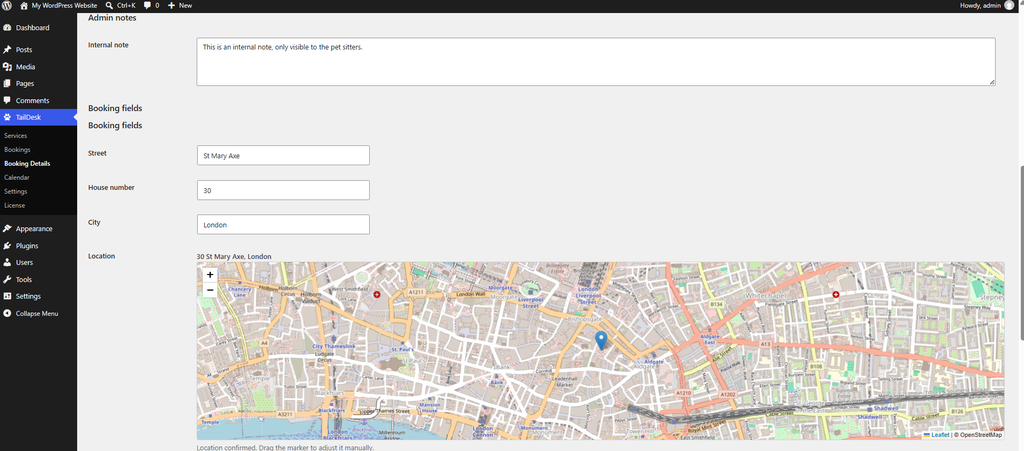
Add an Internal note
- Find the Internal note field.
- Enter the information you want to keep with the booking.
- Click Update Booking to save your changes.
The note remains attached to that booking and can be reviewed again later from Booking Details.
Internal note vs Customer note
TailDesk keeps these two types of notes separate:
| Field | Purpose |
|---|---|
| Customer note | Information supplied by or associated with the customer request. |
| Internal note | Private operational information for administrators and staff. |
The Internal note is separate from the standard public Booking Form output. Use the Customer note when you need to preserve what the customer submitted, and use Internal note for your own workflow.
Examples of useful internal notes
- Special instructions for the staff member handling the booking.
- A reminder to contact the customer before the booking starts.
- Operational details that were agreed outside the booking form.
- A short handover note for another TailDesk user.
Keep internal notes focused on information that is useful for managing the booking. Customer-facing information is better kept in the appropriate customer fields or communication channel.
Available in TailDesk Free and Pro
Internal notes are part of the core TailDesk booking workflow and are available in TailDesk Free. TailDesk Pro can add more service-specific booking information on the same Booking Details screen, such as custom booking fields, detailed pricing and route information, while the Internal note remains your general private staff note for the booking.