
Configure Invoice Numbering and Invoice Templates
TailDesk uses a yearly invoice number sequence and stores each generated invoice as a document snapshot. TailDesk Pro extends the invoice system with reusable templates, branding controls and multiple invoice documents per booking.
Open the Invoice settings
- Go to TailDesk > Settings.
- Open the Invoices tab.
- Review the invoice number settings and, with TailDesk Pro, the invoice template manager.
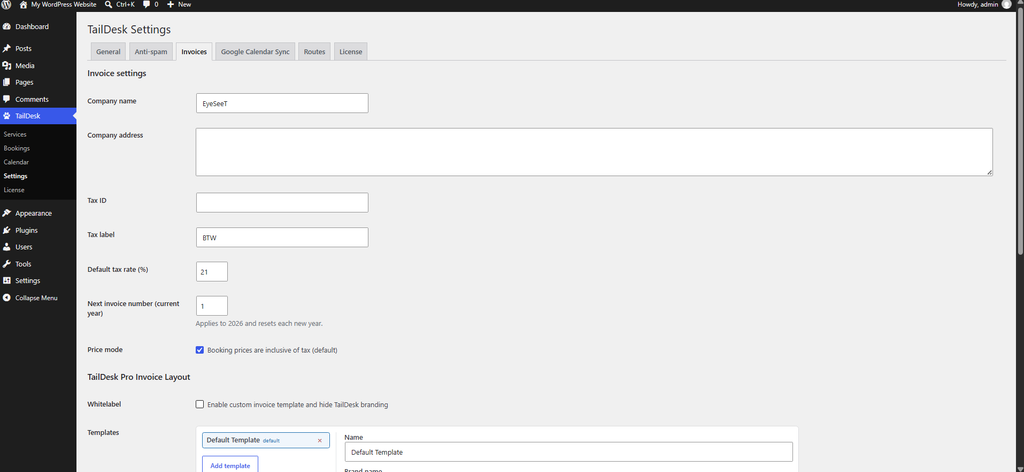
How invoice numbering works
TailDesk uses a yearly sequence for invoice numbers. A typical invoice number looks like:
2026-0001The year is part of the invoice number, and the sequence number is separate from the booking ID.
The Next invoice number (current year) field controls which sequence TailDesk should use next. The sequence resets for a new year.
Avoid duplicate invoice numbers
If the configured next number would collide with an invoice that already exists, TailDesk can show a Potential duplicate invoice numbers warning.
Use Recover to conflict-free number when you want TailDesk to advance the current-year counter beyond the highest known conflicting sequence.
Depending on the situation, TailDesk can also provide a way to remove a conflicting generated invoice document. Use destructive invoice actions carefully, because generated invoices are historical snapshots.
Invoice numbers belong to generated documents
An invoice number is assigned when an invoice document is generated. The invoice is then stored as an immutable snapshot containing the invoice data and rendered output from that moment.
Changing a booking, service price or invoice settings later does not silently rewrite that already generated invoice.
Configure invoice templates with TailDesk Pro
TailDesk Pro adds a TailDesk Pro Invoice Layout section to the Invoices settings. This lets you create and manage multiple reusable invoice templates.
Each template can contain:
- Name – the internal template name.
- Brand name – the brand label used in the invoice layout.
- Logo URL – an optional logo used by the template.
- Template markup – the HTML and supported style markup that defines the invoice output.
- Set as default – makes the template the default selection when generating an invoice.
Use Add template to create another invoice layout. TailDesk keeps at least one template available. If the current default is deleted, another remaining template becomes the default.
Whitelabel invoice output
TailDesk Pro includes the option Enable custom invoice template and hide TailDesk branding. Use this when you want the generated invoice to follow your own brand presentation instead of the standard TailDesk branding profile.
Use placeholders in invoice templates
Template markup can include placeholders that TailDesk replaces with invoice, booking, customer and company data when the invoice is generated.
Common placeholders include:
{{invoice_number}}{{generated_at}}{{service_name}}{{date_range}}{{billable_days}}{{customer_name}}{{customer_email}}{{issuer_name}}{{issuer_address}}{{issuer_tax_id}}{{subtotal}}{{tax_label}}{{tax_amount}}{{total}}{{logo_url}}{{brand_label}}
TailDesk Pro also provides dedicated placeholders for tax-inclusive and tax-exclusive subtotal and total values.
Render detailed pricing rows
Invoice templates can repeat the stored booking pricing rows with the {{#price_rows}} loop.
{{#price_rows}}
{{row_label}} — {{row_total_display}}
{{/price_rows}}
Available row placeholders include values such as {{row_label}}, {{row_details}}, {{row_total_display}}, {{row_total_incl_tax}} and {{row_total_excl_tax}}.
Template markup is sanitized
The template field can contain the allowed invoice HTML and a <style> block in the same template document. TailDesk sanitizes the markup against an allowlist before storing and rendering it.
Choose a template when generating an invoice
When TailDesk Pro multiple invoice documents are enabled, Booking Details shows an Invoice documents workflow.
- Open the booking.
- Select the invoice template you want to use.
- Click Generate invoice.
- Open the generated document from the invoice document list.
The configured default template is preselected, but you can choose another template before generating the document.
Multiple invoice documents per booking
TailDesk Pro can keep multiple generated invoice documents for the same booking. Each document has its own document snapshot and invoice number.
This makes it possible to preserve earlier generated documents while creating another invoice with a different template or updated booking data when your workflow requires it.
Free and Pro at a glance
| Feature | TailDesk Free | TailDesk Pro |
|---|---|---|
| Yearly invoice numbering | Yes | Yes |
| Duplicate-number warning and recovery | Yes | Yes |
| Invoice snapshot | Yes | Yes |
| Custom invoice templates | No | Yes |
| Default template selection | No | Yes |
| Whitelabel invoice layout | No | Yes |
| Multiple invoice documents per booking | No | Yes, when enabled |