
How Date Selection and Price Calculation Work
TailDesk uses day-based bookings rather than appointment timeslots. Customers choose a service, a start date and an end date, and TailDesk checks every calendar day in that range before the booking request can be submitted.
The same date range is also used to calculate the booking price. In TailDesk Free this is straightforward: daily price multiplied by the number of billable days. TailDesk Pro can extend that calculation with service extras, day-specific adjustments and excluded booking days.
Start and end dates are inclusive
Both the start date and the end date count as booking days.
For example, a booking from 10 June through 12 June contains three booking days:
- 10 June
- 11 June
- 12 June
A booking where the start and end date are the same day contains one billable day.
How public date selection is validated
On the public Booking Form, the start date cannot be in the past. The end date must be the same as or later than the start date.
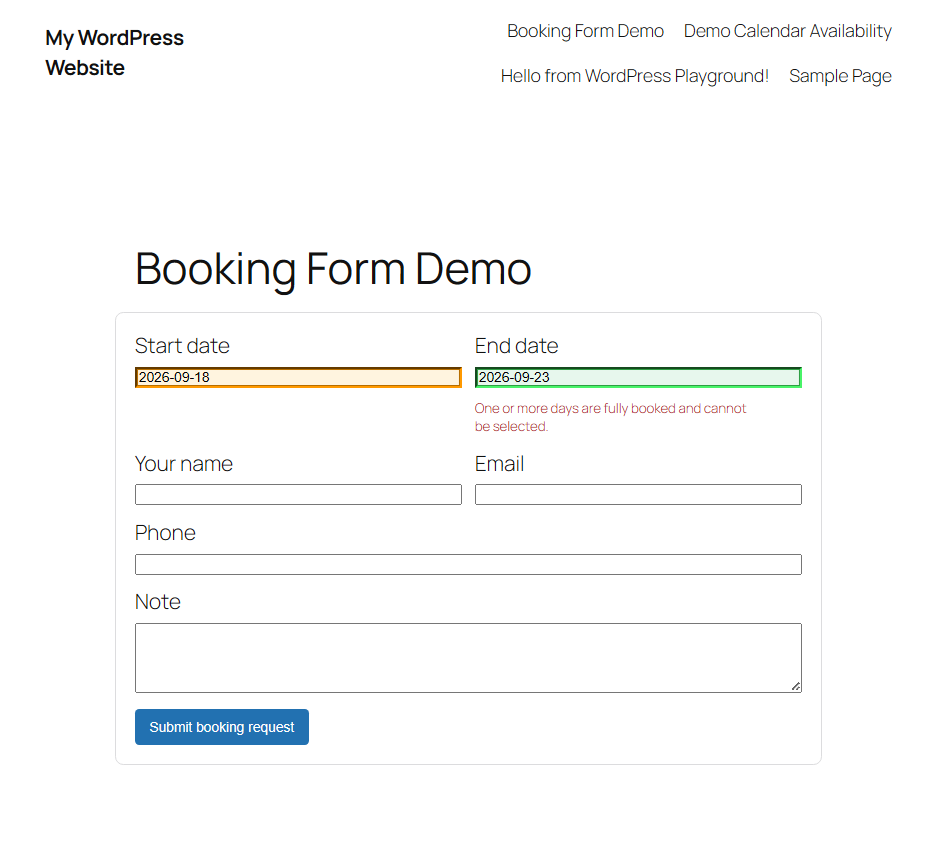
TailDesk checks every date in the selected range against the service’s availability. If one of those dates is unavailable, the booking is normally blocked.
Availability is checked again when the form is submitted
The availability shown while a customer is choosing dates is not treated as a permanent reservation. TailDesk validates the complete range again when the customer submits the booking request.
This matters when two customers are booking at almost the same time. If another request takes the final available capacity before the second customer submits, TailDesk can reject the second range instead of silently creating an overbooking.
Free price calculation
In TailDesk Free, the base booking price is:
Price per day × Billable days
Example:
- Price per day: €20.00
- Start date: 10 June
- End date: 12 June
- Billable days: 3
The base total is therefore €60.00.
Price changes do not rewrite existing bookings
When a booking is created, TailDesk stores a pricing snapshot. That snapshot includes values such as the daily rate, billable day count and total price used for that booking.
If you later change a service’s daily price, existing bookings do not automatically change. Their historical price remains intact unless you deliberately recalculate or edit the booking through a workflow that updates pricing.
TailDesk Pro price calculation
TailDesk Pro can build a more detailed booking price while keeping the same inclusive date model.
A Pro total can contain:
- Base service price
- Selected service extras
- Day Rule price adjustments
- Manual booking adjustments added by an administrator
Conceptually, the total is:
Total = Base price + Extras + Day adjustments + Manual adjustments
Service extras
Pro service extras can be priced in different ways. Depending on the configured pricing model, an extra can be charged once per booking, once per day, per selected unit, or per selected unit per day.
For example, an extra priced at €5 per day on a three-day booking contributes €15 to the total.
Day Rule price adjustments
Pro Day Rules can change the price on matching dates. Adjustments can be percentages or fixed amounts and can be positive surcharges or negative discounts.
This is useful for weekends, holidays, seasonal pricing or other dates where the normal daily rate should not apply unchanged.
Excluded booking days in Pro
TailDesk Pro can exclude individual dates from an existing booking while keeping the original start and end range.
Excluded dates do not consume booking capacity and do not count as billable days. They also do not receive Day Rule price adjustments.
For example, a booking from 1 July through 7 July normally contains seven billable days. If 3 July and 5 July are excluded, the booking keeps its 1–7 July range but has five active billable days.
Minimum booking duration with Pro
TailDesk Pro can also require a minimum number of booking days per service. Because date ranges are inclusive, a same-day booking counts as one day.
If a customer selects a shorter range than the configured minimum, TailDesk rejects the public request and asks for a valid date range.
Price display in the Booking Form
With TailDesk Pro, the public Booking Form can show pricing in three ways:
- No Price – do not show a calculated price.
- Total Price – show one calculated total.
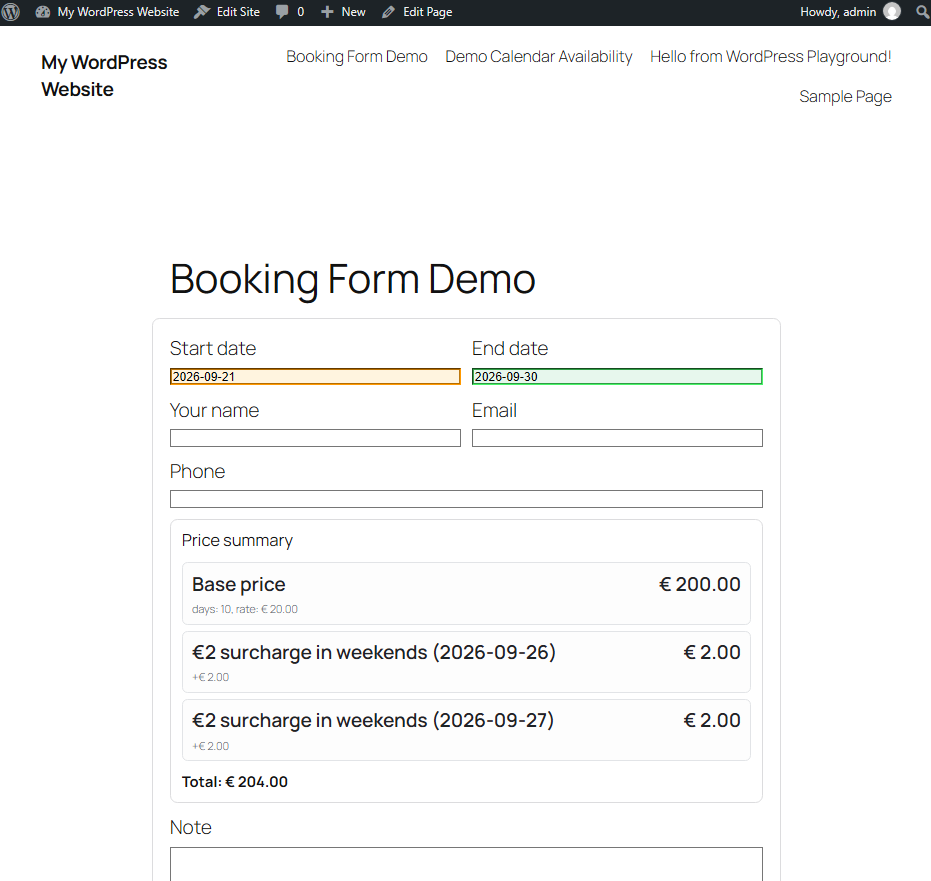
- Detailed Price – show a breakdown of base price, extras, adjustments and total where applicable.
The service has a default price display setting, and an individual Booking Form block can override that setting for a specific page.
Admin bookings can use past dates
The public form blocks bookings that start in the past. Administrators can create or edit bookings with past dates in the WordPress admin, which is useful for correcting or importing historical bookings.
In summary
TailDesk always starts with an inclusive day-based range and checks each date for availability. TailDesk Free calculates the booking from the daily rate and billable days, while TailDesk Pro adds service extras, flexible date-based pricing, minimum durations, detailed price display and the ability to exclude individual booking days.