
Change the Order of Booking Form Fields
The TailDesk Booking Form lets you control the order and width of the fields that visitors see. This is useful when you want a shorter, clearer form or when certain customer details should appear earlier in the booking flow.
Open the Booking Form block settings
- Edit the WordPress page that contains your TailDesk Booking Form.
- Select the Booking Form block.
- Open the block settings in the editor sidebar.
- Open the Field Order panel.
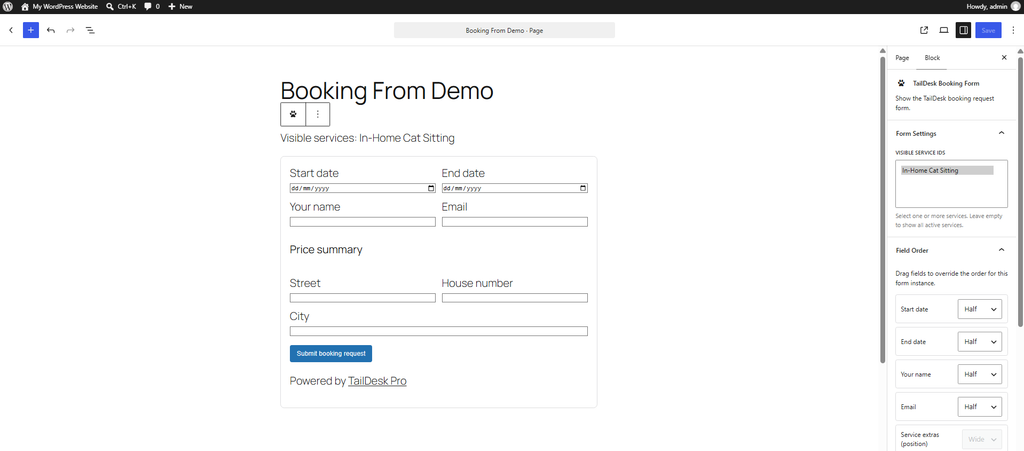
Reorder the fields
Drag the field rows into the order you want visitors to see them. The saved order is used for that specific Booking Form block.
The default TailDesk field order is:
- Start date
- End date
- Your name
- Phone
- Service extras position
- Price summary position
- Note
You can move the normal fields to create a flow that better matches your booking process. For example, you may prefer to place customer details before optional notes, or keep the date fields together at the top of the form.
Choose Half or Wide field widths
Each supported row can use one of two layout widths:
- Half: allows two compatible fields to appear next to each other when the available layout width allows it.
- Wide: gives the field a full-width row.
A common setup is to use Half for short fields such as name, email or phone and Wide for longer inputs such as notes. Some special rows are kept Wide automatically.
Service extras and price summary positions
The rows Service extras position and Price summary position are placeholders in the form layout. They become relevant when TailDesk Pro adds service extras or a price summary to the booking form.
By moving these rows, you can decide where Pro extras and pricing information appear in relation to the normal booking fields. For example, you can place extras directly after the date selection and show the price summary just before the submit button.
Custom fields with TailDesk Pro
TailDesk Pro can add custom booking fields per service. When Pro is active, those custom fields can also participate in the form’s field order where they are valid for the selected service configuration.
This gives you much more control over the booking experience. One service can collect only the standard contact information, while another can add service-specific questions and place them exactly where they make sense in the form.
Changes apply per Booking Form block
Field order and layout are saved for the individual Booking Form block. If you use TailDesk Booking Forms on several pages, you can give each form a different layout without changing the others.
This is especially useful when you create separate landing pages for different services or audiences.
Using field order with the shortcode
If you use the booking form shortcode, you can also control the order with the field_order attribute.
[taildesk_booking_form field_order="start_date,end_date,customer_name,customer_email,customer_phone,customer_note"]Field widths can be set with field_widths, using half or wide for each field.
[taildesk_booking_form field_widths="customer_name:half,customer_email:half,customer_note:wide"]With TailDesk Pro, valid custom field keys and the Pro placeholder positions can also be used where supported by the selected service configuration.