
View Availability in the Admin Calendar
The TailDesk admin calendar gives you a quick overview of service availability from inside WordPress. Use it to check how much capacity is still available on upcoming dates and to identify days that are becoming limited or fully booked.
Open the admin calendar
- Sign in to your WordPress dashboard.
- Open the TailDesk menu.
- Go to the TailDesk calendar view.
Choose the service you want to review
If you offer more than one service, use the service filter to view availability for the service you want to check. Because each service can have its own daily capacity, the same date can have a different availability level for different services.
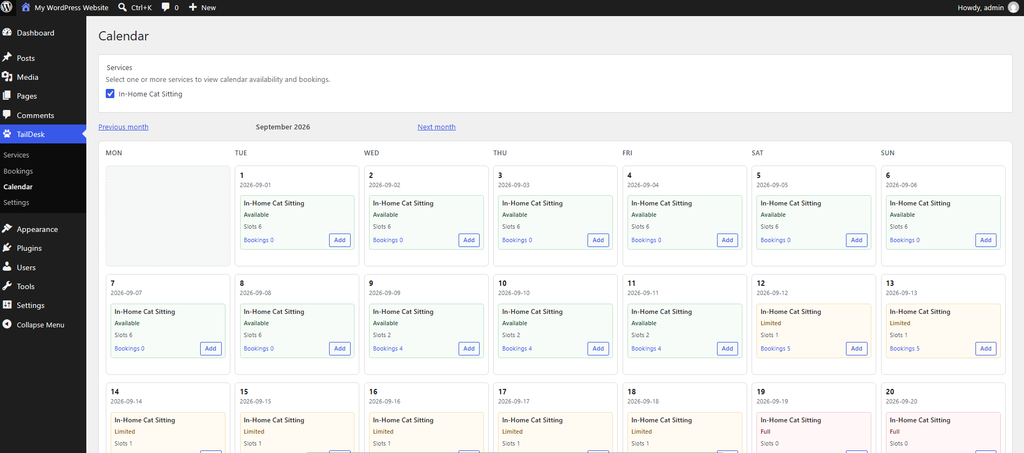
Read the availability for each day
The calendar reflects the capacity that is still available for the selected service. As bookings use that capacity, the availability shown for a date changes accordingly.
- Available — the service still has normal capacity remaining.
- Limited — only a smaller amount of capacity remains.
- Fully Booked — no additional capacity is available for that service on the date.
For a more detailed explanation of these states, see Understand Available, Limited and Fully Booked Statuses.
Move between dates
Navigate through the calendar to review upcoming days and plan ahead. This is useful when you want to check busy periods, confirm whether a new request can fit within your capacity, or quickly review availability before creating or changing a booking in the admin area.
Why availability may change
The admin calendar is based on your service capacity and the bookings that use that capacity. When bookings are added, updated or removed, the availability for affected dates can change.
If the calendar shows less availability than expected, check the service’s daily capacity and review the bookings for the affected date.
Tip: Use the service filter when you manage multiple services. Capacity is tracked per service, so checking the correct service is important when reviewing a date.