
Set a Service Name, Daily Price and Capacity
Each TailDesk service has its own name, daily price and daily capacity. These settings define how the service is presented to customers, how the base booking price is calculated and how many bookings the service can accommodate on a single day.
Open the service settings
- In your WordPress dashboard, go to TailDesk → Services.
- Create a new service or open an existing service to edit it.
- Locate the fields for the service name, daily price and capacity.
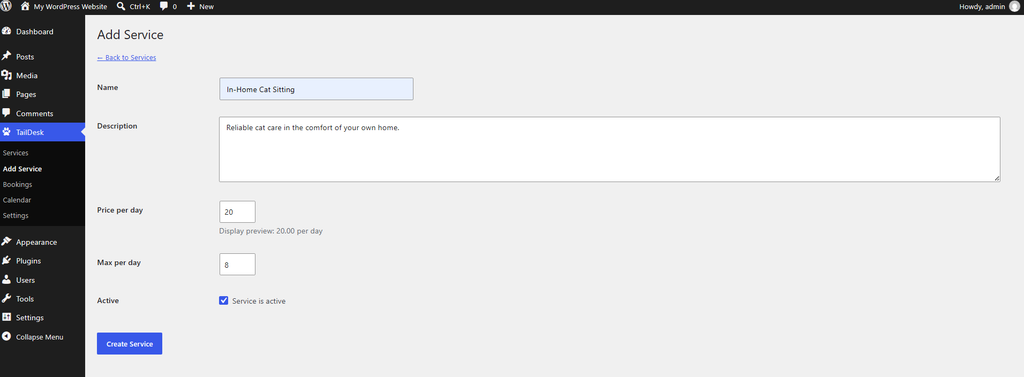
Set the service name
Enter a clear name that describes what customers are booking, for example Dog Daycare, Home Boarding or Cat Sitting.
The service name is used throughout TailDesk, including in booking forms and service selections, so choose a name that is easy for both you and your customers to recognize.
Set the daily price
Enter the standard price you charge for one day of this service. TailDesk uses the service’s daily rate as the base price for day-based bookings.
Enter the numeric price only. The way prices are displayed, such as the currency symbol and price format, is controlled by TailDesk’s global pricing settings.
Set the daily capacity
Set the maximum number of places you can handle for this service on one day. TailDesk uses this value when calculating availability for the service.
For example, if you can care for a maximum of 6 dogs in daycare on the same day, set the service capacity to 6. A different service can have its own capacity, so you can match each service to the way your business actually operates.
Save the service
Review the name, daily price and capacity, then save or update the service. The updated settings will be used by TailDesk wherever that service is available.
Tip: Keep your capacity realistic. TailDesk is designed around day-based capacity rather than appointment time slots, so this number should represent how many places you can genuinely provide for the service on a typical day.